
Basic usage
This page will walk you through the basics of creating mappings, converting one object to another, and different ways how to make it easier.
You can find complete references for all the functions in the Defining mappings.
Battle plan
Let's have a look at the our demo application. We want to create a simple NPM package registry API:
We will parse a JSON file with package metadata and save it to the database.
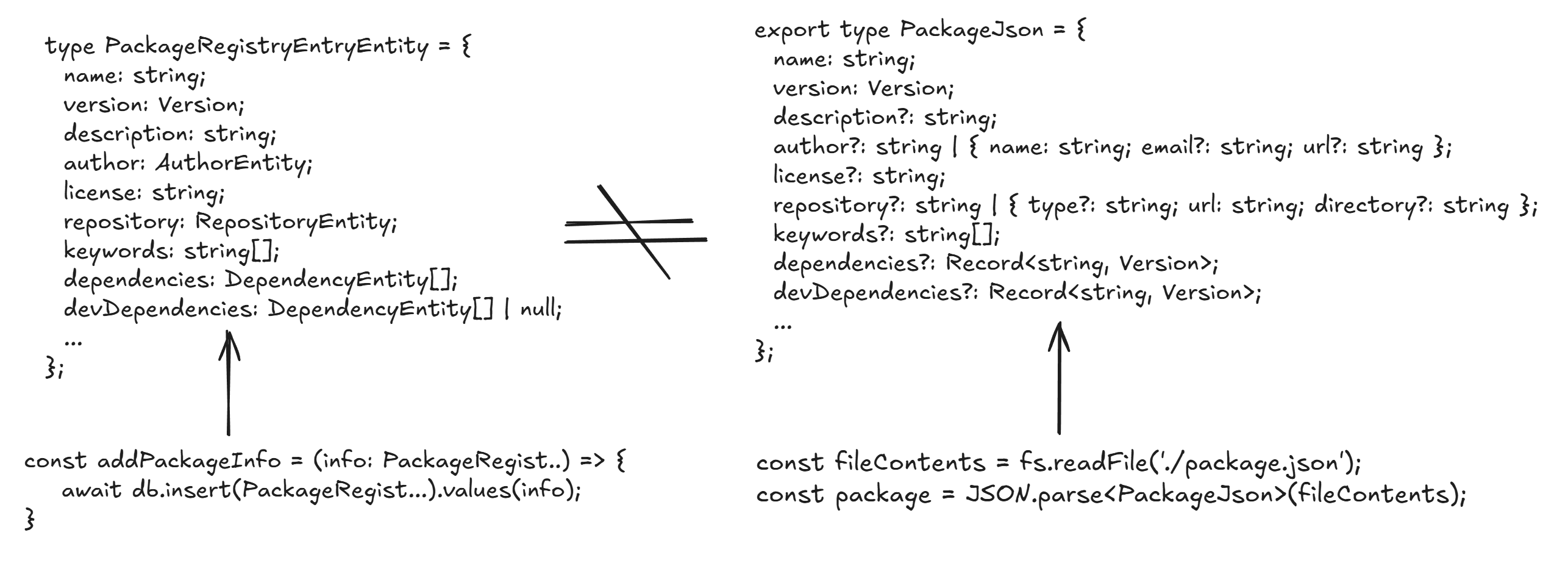
NOTE
Look at these two types carefully. They are similar, but not identical. Database accepts only Nullable fields, while parsed JSON file can have omitted fields. It is not possible to assign our file straight to the database. Let's convert it!
At the end of the article, we will map the full PackageJson object.
Compile a mapper
To create a mapper, use compileMapper.
NOTE
It is better to separate the mapper definition from the mapper usage. Place it in a separate file and export it.
When the field names and types match, you can use the shorthand syntax.
import { compileMapper } from 'mapia';
import { NameRequest } from './api';
import { Name } from './form';

const nameMapper = compileMapper<Name, NameRequest>({
  // These fields type and name matches directly. It will be copied as-is.
  firstName: 'firstName',
  lastName: 'lastName',
});

console.log(
  nameMapper.mapOne({
    firstName: 'John',
    lastName: 'Doe',
  })
);type Name = {
firstName?: string | undefined;
lastName?: string | undefined;
};type NameRequest = {
firstName?: string | undefined;
lastName?: string | undefined;
};TIP
When writing a mapper, you don't have to write direct typings yourself. IDE will advise you to autofill the properties automatically!
FAQ
1. What is this syntax?
const nameMapper = compileMapper<Name, NameRequest>({
  firstName: 'firstName',
  lastName: 'lastName',
});
This is a mapper - a small but powerful abstraction that acts as a contracted bridge between two types.
It is especially useful when connecting:
- Components owned by different teams
- Modules developed at different times
- External systems where you cannot enforce naming conventions or shared type definitions
Instead of relying on structural coincidence, the mapper makes the transformation explicit, intentional, and verifiable at compile time.
2. Why can’t we “map” the old-fashioned way?
TypeScript is structurally typed (often called duck typing).
That means a value is considered valid if it matches the required shape - not if it represents the correct concept.
This flexibility is convenient, but it comes with a cost:
- Missing fields are allowed
- Partial objects silently pass
- Refactors compile but break behavior
- Mission-critical code can drift without alarms
TypeScript optimizes for compatibility, not correctness of intent.
And that’s where silent errors are born.
3. What is duck typing - and why is it dangerous?
Duck typing allows compatibility, but it does not enforce intent.
Consider this example:
const fun = (dto: { firstName?: string }) => {
  console.log(`Hello, ${dto.firstName}!`);
};

fun({ firstName: "Lesya" }); // Hello, Lesya!
At first glance, this looks harmless.
But now the function evolves:
const fun = (dto: { firstName?: string; lastName?: string }) => {
  console.log(`Hello, ${dto.firstName} ${dto.lastName}!`);
};

// Still no errors
fun({ firstName: "Lesya" }); // Hello, Lesya undefined
No compiler error. No warning. No signal that the contract has changed.
This is a ticking time bomb.
The caller is now logically incorrect but still type-correct.
4. How does a mapper fix this?
Our mapper uses a set of type-level techniques to leverage the TypeScript compiler and ensure that all required fields are explicitly mapped.
That is why the mapper intentionally forces you to re-declare each field. This is a one-time, explicit cost that pays off by preventing silent bugs, unsafe refactors, and broken contracts in the future.
You are restricted to:
- Which fields are required
- Which fields are mapped
- Which transformations are allowed
If a field is added, renamed, or removed - the mapper breaks at compile time.
Let's get back to our course.
Rename
Use rename to pull a value from another property. This is the verbose option that keeps your intent explicit and uses TypeScript to ensure the source property exists.
const userMapper = compileMapper<UserResponse, UserEntity>({
  id: rename('userId'),
});type UserResponse = {
userId: string; // matches the type of UserEntity, different name
}type UserEntity = {
id: string; // matches the type of UserResponse, different name
}NOTE
Note that the keys of the mapper match Target type props (UserEntity) When you write a mapper, first argument of the generics argument specifies SourceType, second specifies TargetType: <Source, Target>
Transform
transform accepts a function that adjusts the value before it hits the destination object.
const userMapper = compileMapper<UserResponse, UserEntity>({
  createdAt: transform((x) => new Date(x)),
});
Property transforms are common across project, so you can use ready shapes to reduce code duplication and bugs.
import { dateShape } from 'mapia';

const userMapper = compileMapper<UserResponse, UserEntity>({
  createdAt: transform(dateShape),
});
Or you can create your own. More about shapes
Ignore
Use ignore for fields that don't exist on the source and are optional in the destination.
const userMapper = compileMapper<UserResponse, UserEntity>({
  id: 'id',
  updatedAt: ignore(),
});type UserResponse = {
id: string;
}type UserEntity = {
id: string;
updatedAt?: Date; // Optional. Will be filled at the database insert
}Nested Structures
Direct mapping
Mapia can handle nested objects and arrays without extra ceremony.
In the first case we have a country property, which is mapped directly, because their target type and source type are equal.
const addressMapper = compileMapper<AddressResponse, AddressEntity>({
  street: 'street',
  country: 'country',
  city: 'city',
  zipCode: rename('zip'),
});type CountryResponse = {
name: string;
code: string;
}
type AddressResponse = {
street: string;
country: CountryResponse;
zip: string;
}type CountryEntity = {
name: string;
code: string;
}
type AddressEntity = {
street: string;
country: CountryEntity;
zipCode: string;
}map directive
What if our nested objects aren't the same? Well, this is not a problem! This is a very common use case, and we have a special directive for it: map
It maps the object if the source and target prop keys are equal, but their contents are uneven
const addressMapper = compileMapper<AddressResponse, AddressEntity>({
  street: 'street',
  country: map({
    countryName: rename('name'),
    code: 'code',
  }),
  city: 'city',
  zipCode: rename('zip'),
});type CountryResponse = {
name: string;
code: string;
}
type AddressResponse = {
street: string;
country: CountryResponse;
zip: string;
}type CountryEntity = {
countryName: string;
code: string;
}
type AddressEntity = {
street: string;
country: CountryEntity;
zipCode: string;
}flatMap directive
This directive name was inspired by Array.prototype.flatMap, but instead of arrays, it switches context.
Let's have a look at the response.ts: we removed the CountryResponse type and flattened AddressResponse structure. If we try use map({}), it won't be able to see top properties.
flatMap hoists our context to pick property we want
/** === this will NOT work **/
const addressMapper = compileMapper<AddressResponse, AddressEntity>({
  street: 'street',
  country: map({
    countryName: 'countryName',
    code: rename('countryCode'),
  }),
  city: 'city',
  zipCode: rename('zip'),
});

/** === this is CORRECT === **/
const addressMapper = compileMapper<AddressResponse, AddressEntity>({
  street: 'street',
  country: flatMap({ // change map to flatMap
    countryName: 'countryName',
    code: rename('countryCode'),
  }),
  city: 'city',
  zipCode: rename('zip'),
});type AddressResponse = {
street: string;
countryName: string;
countryCode: string;
zip: string;
city: string;
}type CountryEntity = {
countryName: string;
code: string;
}
type AddressEntity = {
street: string;
country: CountryEntity;
zipCode: string;
city: string;
}Working with arrays
map directive is a very flexible and powerful tool - it can even work with arrays!s
You don't have to specify the 'mode' or some settings. Mapper will recognize your type at runtime and map everything correct
const carWashAnalyticsMapper = compileMapper<CarWashStatisticsResponse, CarWashStatistics>(
  {
    id: 'id',
    todayClients: map({
      clientID: rename('id'),
      totalPaycheck: rename('ltv'),
      carModel: 'carModel'
    }),
    topClients: map({})
  }
);type ClientResponse = {
id: string;
carModel: string;
ltv: number;
lastVisitedAt: Date;
}
type CarWashStatisticsResponse = {
id: string;
todayClients: ClientResponse[];
topClients: ClientResponse[];
}type ClientEntity = {
carModel: string;
totalPaycheck: number;
clientID: string;
}
type CarWashStatistics = {
id: string;
todayClients: ClientEntity[];
topClients: ClientEntity[];
}NOTE
Rename would not allow you to pick arbitrary field - only those are having same type and in the same (or more deep) context
Nullable objects, optional objects
You also can map objects and arrays whose type is a union with null or undefined.
- For
null|undefined=>nullyou should usenullalbleMap - For
null|undefined=>undefinedyou should useoptionalMap
const mapper = compileMapper<MedicalHistoryForm, MedicalHistory>({
  personalInformation: 'personalInformation',
  diagnoses: nullableMap({
    date: 'date',
    code: 'code',
    name: 'name',
    diagnosingPhysican: 'diagnosingPhysican',
  }),
});type DiagnoseForm = {
date: Date;
code: string;
name: string;
diagnosingPhysican: `${string} ${string} ${string}`
}
type PersonalInformationForm = {
name: string;
contactNumber: string;
}
type MedicalHistoryForm = {
personalInformation: PersonalInformation;
diagnoses?: Diagnose[];
}type Diagnose = {
date: Date;
code: string;
name: string;
diagnosingPhysican: `${string} ${string} ${string}`
}
type PersonalInformation = {
name: string;
contactNumber: string;
}
type MedicalHistory = {
personalInformation: PersonalInformation;
diagnoses: Diagnose[] | null;
}Final Result
Now, when we've learned basic aspects of Mapia, we can ready our NPM package mapper:
type OK_PackageRegistryEntryResponse = DeepCastTypes<PackageRegistryEntryResponse, undefined, null>

const packageRegistryFromResponseToEntity = compileMapper<
  OK_PackageRegistryEntryResponse,
  PackageRegistryEntryEntity
>({
  name: "name",
  description: "description",
  license: "license",
  keywords: "keywords",
  scripts: "scripts",
  private: 'private',
  readme: 'readme',
  homepage: transform(urlOrNullShape),
  version: "version",
  author: map({
    name: "name",
    email: "email",
    url: transform(urlOrNullShape),
  }),
  repository: map({
    url: transform(urlOrThrowShape),
    type: 'type',
  }),
  dependencies: "dependencies",
  devDependencies: 'devDependencies',
  peerDependencies: 'peerDependencies',
  optionalDependencies: 'optionalDependencies',
  engines: 'engines',
  bugs: nullableMap({
    email: 'email',
    url: transform(urlOrThrowShape),
  }),
  funding: nullableMap({
    url: transform(urlOrThrowShape),
    type: "type"
  }),
  dist: nullableMap({
    tarball: transform(urlOrThrowShape),
    integrity: 'integrity',
    shasum: "shasum"
  }),
  hasTwoFactorAuth: rename("twoFactor"),
  enabledNotifications: rename("notifications"),
  safeMode: 'safeMode',
  contributors: nullableMap({
    name: "name",
    email: "email",
    url: transform(urlOrNullShape),
  }),
  publishConfig: nullableMap({
    access: "access",
    registry: transform(urlOrNullShape),
  }),
  maintainers: nullableMap({
    name: "name",
    email: "email",
    url: transform(urlOrNullShape),
  }),
});const packageRegistryResponse: PackageRegistryEntryResponse = {
name: "example-package",
version: "1.0.0",
description: "An example package",
author: {
name: "Steve Jobs",
email: "steve.jobs@gmail.com",
url: "https://apple.com",
},
license: "MIT",
repository: {
type: "git",
url: "https://github.com/facebook/react",
},
keywords: ["example", "package"],
dependencies: {
react: "18.0.0",
"react-dom": "18.0.0",
},
devDependencies: {
typescript: "4.5.0",
jest: "27.0.0",
},
scripts: {
start: "react-scripts start",
build: "react-scripts build",
test: "react-scripts test",
eject: "react-scripts eject",
},
engines: {
node: ">=14.0.0",
npm: ">=6.0.0",
pnpm: ">=6.0.0",
yarn: ">=1.0.0",
},
bugs: {
url: "https://github.com/facebook/react/issues",
email: "steve.jobs@gmail.com",
},
homepage: "https://github.com/facebook/react",
contributors: [
{
name: "Steve Jobs",
email: "steve.jobs@gmail.com",
url: "https://apple.com",
},
],
funding: {
type: "individual",
url: "https://github.com/facebook/react",
},
private: false,
publishConfig: {
registry: "https://registry.npmjs.org/",
access: "public",
},
readme: "This is an example package.",
twoFactor: true,
notifications: true,
safeMode: true,
dist: {
shasum: "abc123",
tarball:
"https://registry.npmjs.org/example-package/-/example-package-1.0.0.tgz",
integrity: "sha512-abc123",
},
};
console.log(
packageRegistryFromResponseToEntity.mapOne(deepCastTypes(packageRegistryResponse, 'undefined', 'null'))
);type Author = {
name: string;
email: string;
url?: string;
};
type Repository = {
type: "git" | "svn" | "mercurial";
url: string;
};
type Engines = {
node?: string;
npm?: string;
pnpm?: string;
yarn?: string;
};
type Bugs = {
url: string;
email?: string;
};
type Contributor = {
name: string;
email: string;
url?: string;
};
type Funding = {
type: "individual" | "organization";
url: string;
};
type PublishConfig = {
registry?: string;
access?: "public" | "restricted";
};
type Maintainer = {
name: string;
email: string;
url?: string;
};
type Dist = {
shasum: string;
tarball: string;
integrity?: string;
};
type PackageRegistryEntry = {
name: string;
version: Version;
description: string;
author: Author;
license: string;
repository: Repository;
keywords: string[];
dependencies: Record<string, Version>;
devDependencies?: Record<string, Version>;
peerDependencies?: Record<string, Version>;
optionalDependencies?: Record<string, Version>;
scripts: Record<string, string>;
engines?: Engines;
bugs?: Bugs;
homepage?: string;
contributors?: Contributor[];
funding?: Funding;
private?: boolean;
publishConfig?: PublishConfig;
readme?: string;
maintainers?: Maintainer[];
dist?: DistResponse;
};type AuthorEntity = {
name: string;
email: string;
url: URL | null;
};
type RepositoryEntity = {
type: "git" | "svn" | "mercurial";
url: URL;
};
type EnginesEntity = {
node: string | null;
npm: string | null;
pnpm: string | null;
yarn: string | null;
};
type BugsEntity = {
url: URL;
email: string | null;
};
type ContributorEntity = {
name: string;
email: string;
url: URL | null;
};
type Version = `${number}.${number}.${number}`;
type FundingEntity = {
type: "individual" | "organization";
url: URL;
};
type PublishConfigEntity = {
registry: URL | null;
access: "public" | "restricted" | null;
};
type MaintainerEntity = {
name: string;
email: string;
url: URL | null;
};
type DistEntity = {
shasum: string;
tarball: URL;
integrity: string | null;
};
type PackageRegistryEntryEntity = {
name: string;
version: Version;
description: string;
author: AuthorEntity;
license: string;
repository: RepositoryEntity;
keywords: string[];
dependencies: Record<string, Version>;
devDependencies: Record<string, Version> | null;
peerDependencies: Record<string, Version> | null;
optionalDependencies: Record<string, Version> | null;
scripts: Record<string, string>;
engines: EnginesEntity | null;
bugs: BugsEntity | null;
homepage: URL | null;
contributors: ContributorEntity[] | null;
funding: FundingEntity | null;
private: boolean | null;
publishConfig: PublishConfigEntity | null;
readme: string | null;
maintainers: MaintainerEntity[] | null;
dist: DistEntity | null;
};More real-world examples live in the examples directory.